Title

Try searching by key words, order- or product code or serial number e.g. “CM442” or “Technical information”
Enter at least 2 characters to start the search.

Product support

Micropilot FMR67

Support page: Radar measurement Micropilot FMR67

Find the resources, documentation, and assistance you need to get the most from your device throughout its lifecycle — all in one place.

Visit product page
Order code FMR67
Serial number Not specified
Search for product Search for product

Search by product name , order code, or a serial number .

No product matches your search. Please check the spelling or try a different term.

Search history

Matching products

0 Products

Find your product

Enter your product name, a serial number, or an order code

Enter at least two characters to start the search

Serial number or order code

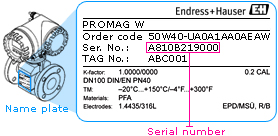
You can find both the order code and serial number on the device’s nameplate.

Order code examples
  • TMT85-1J23115
  • FMR240-A3E1GNJAA3A
Serial number examples
  • C202DC02000
  • DB015C0108D

Device profile

View key information about your device, including product details, configuration, firmware, approvals, and lifecycle status.

Access device-specific information with a serial number or an order code.
Displaying device profile for:
General information

Order code

FMR67

Device type

Sensor with transmitter

Manufacturer

Endress+Hauser

Product status

warning sign Discontinued

Phase out policy

Endress+Hauser are committed to the long term support of all our products

We undertake support and service for our products for a period of ten years after notice of product withdrawal (until spareparts are not available any more)

However we reserve us the right to offer alternative solutions including replacement products if deemed more appropriated.

Product status

Product root FMR67
Name Radar measurement Micropilot FMR67
Product status In phase out
Phase out date 5/2024
Order stop 12/2025
Spare sensor until not applicable
Calibration until not applicable
Spares available 7/2029
Repair until not applicable
New alternative FMR67B
Maintenance advice
Asset details

Serial number

n / a

Firmware version

n / a

Production date

n / a

Communication

n / a

Configuration ID

Approval

Non-hazardous area

AA

Discover more about your plant with Netilion

Discover Netilion, our industrial IoT ecosystem that connects your devices, regardless of brand, through one smart, secure and scalable platform that transforms data into actionable insights.
Go to Netilion

Downloads

A complete collection of technical documentation, certificates, operating instructions, software, and other resources related to your device.

Access product specific downloads with a serial number or an order code.
Displaying downloads for:
175 Downloads
Operating Instruction (BA)
Most downloaded
Micropilot FMR67 HART Operating Instructions Free space radar
English version - 04/2018
Download
Technical Information (TI)
Most downloaded
Micropilot FMR67 Free space radar
English version - 09/2020
Download
Device Parameter (GP)
Most downloaded
Micropilot FMR6x HART Description of Device Parameters Free-space radar
English version - 01/2017
Download
Technical Information (TI)
Micropilot FMR67 Free space radar
English version - 09/2020
Download
Operating Instruction (BA)
Micropilot FMR67 HART Operating Instructions Free space radar
English version - 04/2018
Download
Device Parameter (GP)
Micropilot FMR6x HART Description of Device Parameters Free-space radar
English version - 01/2017
Download
Short Instruction (KA)
Micropilot FMR67 HART Brief Operating Instructions Free space radar
English version - 04/2018
Download
Installation Instructions (EA)
M12 connector, IP66/68 NEMA4X/6P, ProToF Installation Instructions Levelflex FMP5x
Micropilot FMR5x, FMR6x
English version - 10/2019
Download
Installation Instructions (EA)
EA Set of housing securing clamps Levelflex FMP5x, Micropilot FMR5x, FMR6x, Promag 200, Promass 200, Prosonic Flow 200, Prowirl 200
English version - 09/2026
Download
Installation Instructions (EA)
Replacing the display module Installation Instructions Promag 200, Promass 200, Prosonic Flow 200, Prowirl 200, t-mass 150,
Levelflex FMP5x, Micropilot FMR5x, Micropilot FMR6x, Remote dis
play FHX50
English version - 09/2017
Download
Installation Instructions (EA)
EA Safety instructions for spare parts Level and Pressure
English version - 01/2026
Download
Installation Instructions (EA)
Main electronics module Installation Instructions Levelflex FMP5x, Micropilot FMR5x, Micropilot FMR6x
English version - 08/2017
Download
Installation Instructions (EA)
Antenna assembly Installation Instructions Micropilot FMR60, FMR62, FMR67
English version - 09/2017
Download
Installation Instructions (EA)
EA UNI, PP flange DN 80 (3") to DN 150 (6"), Seal Micropilot
English version - 02/2025
Download
Installation Instructions (EA)
EA Cover, cover seal Levelflex FMP5x, Micropilot FMR5x, FMR6x, Promag 200, Promass 200, Prosonic Flow 200, Prowirl 200, Remote Display FHX50
English version - 09/2026
Download
Installation Instructions (EA)
EA Housing GT18, GT19, GT20 Levelflex, Micropilot
English version - 12/2025
Download
Installation Instructions (EA)
Flange UNI DN 100 (2") to DN 250 (10"), Seal for alignment unit Micropilot FMR67
English version - 11/2020
Download
Installation Instructions (EA)
EA Housing filter Levelflex FMP5x, Micropilot FMR5x, FMR6x, Promag 200, Promass 200, Prosonic Flow 200, Prowirl 200
English version - 09/2026
Download
Installation Instructions (EA)
I/O module Installation Instructions Levelflex FMP5x, Micropilot FMR5x, Micropilot FMR6x Promag 200, Promass
200, Prosonic Flow 200, Prowirl 200,
English version - 08/2017
Download
Installation Instructions (EA)
Transmitter electronics FHX50 Installation Instructions Levelflex FMP5x, Micropilot FMR5x, Micropilot FMR6x Promag 200, Promass
200, Prosonic Flow 200, Prowirl 200,
English version - 07/2018
Download
Installation Instructions (EA)
Terminal set Installation Instructions Levelflex FMP5x, Micropilot FMR5x, Micropilot FMR6x, Promag 200, Promass
200, Prosonic Flow 200, Prowirl 200,
English version - 08/2017
Download
Installation Instructions (EA)
EA Sealing set Levelflex FMP5x, Micropilot FMR5x, FMR6x, Promag 200, Promass 200, Prosonic Flow 200, Prowirl 200, Remote Display FHX50
English version - 09/2026
Download
Ex Safety Instruction (XA)
Micropilot FMR67 4-20 mA HART
Ex ta IIIC T<sub>500</sub> 125°C Da
Ex ta/tb IIIC T85°C Da/Db
English version - 12/2020
Download
Ex Safety Instruction (XA)
Micropilot FMR60, FMR62, FMR67 Control Drawing XP/DIP Safety Instructions Microwave Level Measurement
English version - 02/2018
Download
Ex Safety Instruction (XA)
Micropilot FMR60, FMR62, FMR67 4-20 mA HART
Ex nA IIC T6 Gc
Ex ic IIC T6 Gc
English version - 03/2022
Download
Ex Safety Instruction (XA)
Micropilot FMR67 4-20 mA HART
Ex tD A20/A21 IP6X T85°C
English version - 03/2022
Download
Ex Safety Instruction (XA)
Micropilot FMR60, FMR62, FMR67 4-20 mA HART
ATEX, IECEx:
Ex ia/db [ia Ga] IIC Ga/Gb
English version - 02/2022
Download

Drivers & firmware

Available firmware and device drivers (including DTM, EDS and EDD) associated with your product configuration and software environment.

Access product specific downloads with a serial number or an order code.
Displaying device drivers for:
7 Downloads
Electronic Device Description (EDD)
Electronic Data Description (EDD) - FMR6x - HART Emerson, AMS, 11.0
Emerson, AMS, 10.0
Emerson, AMS, 11.1
Emerson, AMS, 10.5
Emerson, AMS, 11.5
Language neutral - 08/2018
Download
Electronic Device Description (EDD)
Electronic Data Description (EDD) - Micropilot 6x - HART Any, HART, Any
Language neutral - 06/2022
Download
Electronic Device Description (EDD)
Electronic Data Description (EDD) - Micropilot 6x - HART Any, HART, Any
Language neutral - 05/2025
Download
Electronic Device Description (EDD)
Electronic Data Description (EDD) - FMR6x - HART Emerson, FC475, 3.8
Language neutral - 04/2018
Download
Electronic Device Description (EDD)
Electronic Data Description (EDD) - FMR6x - HART Honeywell, Field Device Manager, R450.1
Language neutral - 04/2018
Download
Electronic Device Description (EDD)
Electronic Data Description (EDD) - FMR6x - HART SIEMENS, PDM, 9.0.1
SIEMENS, PDM, 6.1
Language neutral - 04/2018
Download
Faceplate
Faceplate - FMR6x - HART Yokogawa, Plant Resource Manager, R3.20
Language neutral - 04/2018
Download

CAD drawings

Visualize your device in detail with interactive 3D CAD models and downloadable engineering drawings.

Access CAD drawings with a serial number or an order code.
Displaying CAD drawings for:
For privacy reasons, CAD drawings do not include customer-specific details such as tags or sensitive data.
No CAD drawing available
Please Wait (spinning wheel)
CAD drawings are available only on desktop devices. Thank you for your understanding.
Add serial number or order code

Enter a serial number or an order code to access device-specific support

Serial number not found.
Serial number doesn’t match this product.Order code doesn’t match this product. Go to Proline Promass F300?
No product matches your search. Please check the spelling or try a different term.
Serial number or order code

You can find both the order code and serial number on the device’s nameplate.

Order code examples
  • TMT85-1J23115
  • FMR240-A3E1GNJAA3A
Serial number examples
  • C202DC02000
  • DB015C0108D
Change version

Still looking for help?

Login to your account

Get expert support, troubleshoot, update and follow your cases.

Login or register now

Reach technical support

You can reach us through our easy-to-use form. We’ll get back to you in 2 to 3 days.

Open support ticket

Share a complaint

Share your complaints, concerns, or suggestions for improvement.

More information

Sales

Are you interested in our offering? Would you like to discuss about your application?

Get in touch with sales

Please fill out the following form to create a request:
or

According to the General Data Protection Regulation, we are obliged to inform you when collecting your data. We fulfil this information duty with the following Data Protection Statement Germany>>>

Please let us know as detailed as possible how we can help you. That way we can get back to you with the best possible answer.